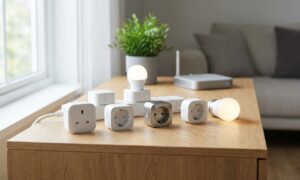
How to choose a smart plug comes down to three things: checking whether it needs a hub, confirming it works with your existing smart home app, and deciding if you actually need energy monitoring. Skip those checks, and you risk buying a gadget that never talks to your other devices.
Smart plugs look simple. Plug it in, connect it to Wi-Fi, and control a lamp from your phone. But the smart home market is full of small compatibility traps that only show up after you’ve already opened the box. This guide walks through exactly how to choose a smart plug so you avoid those traps and pick a device that fits your setup the first time.
Why Smart Plug Shopping Feels Confusing
Walk into any electronics aisle and you’ll see dozens of nearly identical white boxes. Some say “works with Alexa.” Others mention Matter, Zigbee, or a proprietary hub. The specs rarely explain what that means in practice.
Most buyers just want a plug that turns a lamp on with their voice or a schedule. The confusion isn’t about wanting too much—it’s about the industry using too many overlapping standards. Understanding how to choose a smart plug starts with recognizing which of these standards actually matters for your home.
Step 1: Understand Hub Requirements Before You Buy
Some smart plugs connect directly to your home Wi-Fi. Others need a separate hub device to bridge them to the internet. This distinction matters more than almost any other spec, and it’s usually the first thing to sort out when learning how to choose a smart plug.
- Wi-Fi plugs: Connect straight to your router. No extra hardware needed. Easiest for beginners.
- Zigbee or Z-Wave plugs: Require a compatible hub (like a SmartThings or Hubitat hub). Often more reliable at scale but add upfront cost.
- Matter-enabled plugs: A newer standard designed to work across ecosystems, though hub requirements still vary by brand.
If you already own a smart speaker or hub, check its supported protocols before buying. If you’re starting from scratch, a Wi-Fi plug is usually the simpler entry point.
Weak Wi-Fi coverage can also sabotage a smart plug setup before it even begins. If your router struggles to reach every outlet in the house, it’s worth reviewing this guide on fixing a router that keeps disconnecting before adding more devices to the network.
Step 2: Check App and Voice Assistant Compatibility
This is where many first-time buyers get burned. A smart plug might work perfectly, but only inside its own branded app. That’s fine if you only own one or two devices. It becomes a mess once you add a smart bulb from one brand and a plug from another.
Before buying, ask these questions:
- Does the plug support Alexa, Google Home, or Apple Home natively?
- Will I need to open a separate app just for this device?
- Does the brand have a history of maintaining its app long-term?
Choosing plugs that integrate with a major voice assistant reduces app clutter significantly. It also future-proofs your setup if you switch brands for other devices later.
Step 3: Decide Whether You Need Energy Monitoring
Many smart plugs advertise energy monitoring as a premium feature. It sounds appealing—track how much power your coffee maker uses, spot energy hogs, save money.
In reality, most casual users check the energy dashboard once, then forget it exists. Energy monitoring is genuinely useful if you’re troubleshooting a high electric bill or running sensitive electronics. For basic on/off scheduling, it’s an unnecessary cost.
Ask yourself honestly: will you check that data monthly, or just once out of curiosity? If it’s the latter, save the money and buy the simpler plug.
Step 4: Match a Smart Plug to Your Actual Devices
Not every appliance belongs on a smart plug. Before buying, check the wattage rating of the plug against what you plan to power.
- Lamps and small electronics: Almost any smart plug handles these safely.
- Space heaters or window AC units: Require plugs rated for higher wattage. Check the label carefully.
- Devices needing instant response: Avoid plugs with a slow app-loading delay if timing matters, like a security light.
Buying based on your specific use case, not just the cheapest option, prevents most regret purchases.
Practical Checklist for How to Choose a Smart Plug
Here’s a quick reference before you check out:
- Confirm it connects to Wi-Fi directly, or you already own the required hub.
- Verify compatibility with your voice assistant or smart home app.
- Skip energy monitoring unless you’ll actually use the data.
- Match the plug’s wattage rating to your appliance.
- Check that the brand offers reliable firmware and app support.
Reliable connectivity is the backbone of any smart home device, plugs included. Anyone building out a broader home network should also compare storage options, since automation setups increasingly depend on local data. Our breakdown of NAS vs cloud storage for a home network is a useful next read if you’re expanding beyond basic smart plugs.
When a Smart Plug Isn’t the Right Fix
Sometimes the issue isn’t the plug at all. If your other electronics—like a laptop or external drive—are also acting unpredictably, the problem might be broader hardware trouble rather than your smart home setup. For instance, if a portable drive randomly disconnects, that’s a separate issue worth solving; see this guide on a portable SSD that isn’t showing up for troubleshooting steps unrelated to smart plugs.
Similarly, if you’re troubleshooting charging issues with portable electronics rather than plugs, this article on a power bank that won’t charge a phone covers a different but related category of everyday tech frustration.
Frequently Asked Questions
What’s the easiest way to choose a smart plug for beginners?
The simplest approach to how to choose a smart plug as a beginner is picking a Wi-Fi-only model that supports your existing voice assistant. This avoids hub costs and app fragmentation entirely.
Do all smart plugs work with Alexa and Google Home?
No. Compatibility varies by brand and model. Always check the product listing for confirmed support before purchasing, rather than assuming universal compatibility.
Is energy monitoring worth paying extra for?
Only if you plan to actively track power usage. Casual users rarely revisit the data after the first week, making it an optional rather than essential feature.
What’s the biggest mistake people make when choosing a smart plug?
The most common mistake is ignoring hub requirements and app compatibility upfront. Learning how to choose a smart plug that matches your existing ecosystem prevents wasted purchases and returns.